DJ rekordbox – DJ App & Mixer
- 4.6
- Rating
- 1.00M
- Installs
- Free
- Price

 Analysis by App-foxy
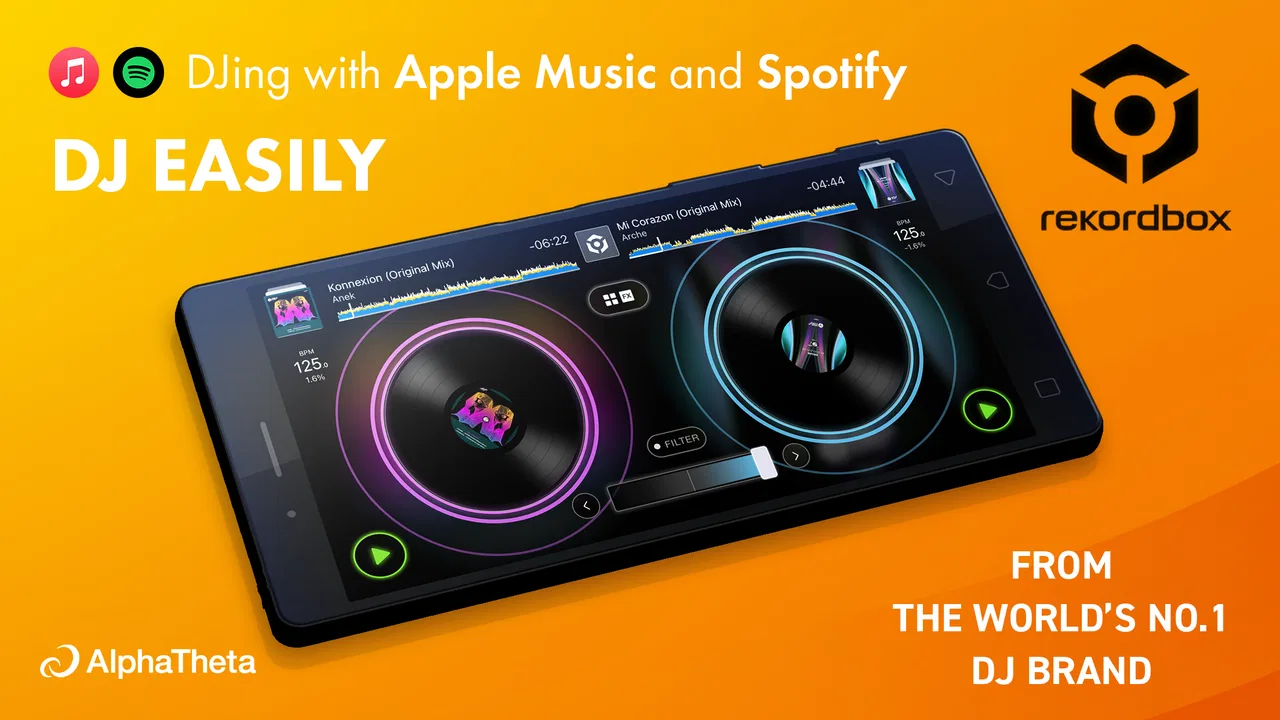
I installed DJ rekordbox – DJ App & Mixer expecting a mobile version of a familiar DJ workspace, and that is broadly what it feels like: a music and audio app built for preparing, organizing, and mixing tracks rather than simply pressing play. Its biggest appeal is the way it brings DJ-style control and access to major streaming services into one place. That makes it interesting for a shared household where one person wants to practice mixing while everyone else still wants quick access to music.
The app is free to download, with optional in-app purchases ranging from around three dollars to fifty dollars per item. It comes from AlphaTheta Corporation, and its 4.6 average from over twenty thousand ratings suggests that many users find the core experience worthwhile. I would still treat it as a serious tool rather than a casual music player. The interface asks you to understand tracks, decks, timing, and library organization, so the best experience depends on who is using it and how much time they are willing to spend learning.
What sharing DJ rekordbox feels like at home
In a household, this app can serve two very different purposes. One person might use it with headphones to practice transitions quietly, while another might want to play music aloud during cooking, cleaning, or a small gathering. The first use is where the app makes the strongest impression. It gives a curious listener something more active to do with music: compare tracks, line up sections, adjust the blend, and gradually develop a sense of timing.
You May Also Like

 Blood Strike: 2.5 Anniversary
Blood Strike’s Loadouts Turn Every Drop Into a Tactical Gamble
A close look at Blood Strike’s custom loadouts: how fast access to signature weapons reshapes its battle royale rhythm, rewards preparation, and narrows the gap between fights.

 Pandora - Music & Podcasts
Pandora’s Music Is Easy to Start, but Harder to Recover
Pandora’s strength is its low-effort path from a seed to a station. Its weak spot is how much confidence it asks you to place in connection, setup, and quiet recovery.

 8 Ball Pool
 Is Built on Rivalries, Rematches, and Routine
A close look at the rivalries, rematches, shared routines, and unanswered safety questions that turn a quick pool match into a persistent mobile community.

 Samsung Music
’s Quiet Strength Is Playing What You Already Own
Its reach comes less from spectacle than from dependable access to a personal library. That simplicity is both the app’s strongest retention engine and its ceiling.

 AccuWeather: Weather Radar
AccuWeather Review: A Quick, Clear Forecast for Everyday Decisions
For everyday plans, the best forecast is the one you can understand quickly. AccuWeather makes rain timing, radar, and local conditions easy to act on, with a few trade-offs.

 Hill Climb Racing
Why Hill Climb Racing Still Turns Crashes Into One More Run
A tiny car, a bumpy hill and one more upgrade: Hill Climb Racing keeps resurfacing because its simple chaos makes every near-miss feel personal.
More From Our News Desk
View All News


The second use requires more coordination. A DJ app is not the same as a shared streaming player. If someone is using the decks, changing the track or adjusting the mix is part of the activity. Another person who expects uninterrupted background music may find that frustrating. I would agree on who is in control before connecting the device to a speaker, especially in a living room where several people may assume they can choose what plays next.
A realistic evening might look like this: one household member prepares a short set before friends arrive, using headphones to check transitions, then connects the device to the room audio for the actual session. Someone else can still listen and offer suggestions, but they should not casually open the app and change the active deck. That simple division prevents the most common shared-device problem: treating a mixing workspace like a normal playlist app.
The important household distinction is between sharing music and sharing control. DJ rekordbox can make music more social, but it does not remove the need for one person to coordinate the session. If your home mainly needs a queue that everyone can edit, a conventional streaming app will usually be easier. If the goal is to learn basic DJ habits together, this app offers much more room for involvement.
Who will get the most from the mixer
I think the app suits beginners who are curious about DJing, mobile users who want to prepare ideas away from a computer, and experienced listeners who already think in terms of intros, drops, tempo, and phrasing. It is also useful for someone who wants to experiment before investing in dedicated equipment. A phone or tablet cannot replace every part of a full DJ setup, but it can make the first steps less intimidating.
It is less suitable for anyone who only wants instant music playback. The extra controls are valuable only when you intend to use them. A person looking for a simple radio, a family playlist, or a child-friendly music player may find the deck layout unnecessarily busy. The app is rated for Everyone, but that age label should not be confused with automatic suitability for every young user. The interface and the connected music sources still call for sensible adult supervision when children are using a shared device.
Setting up without mixing household accounts
Before anyone starts, I recommend deciding which account belongs to the person who will actually use the DJ features. A shared phone can make it tempting to sign in wherever convenient, but music libraries and streaming access are easier to manage when one user takes responsibility for the session. That boundary matters even more if several people in the home have different subscriptions, preferences, or ideas about what should be available.
The app’s integrated access to major streaming services is convenient, but it does not mean every household member should assume they can use every catalog in the same way. Access can depend on the service account being used, so I would check the intended account before building a set around particular tracks. This is a practical precaution rather than a limitation unique to DJ rekordbox: streaming access is often personal, while a household speaker is shared.
I also prefer preparing the library before handing the device to someone else. A clean collection makes it easier to find suitable music and reduces the chance that a child or guest will accidentally disturb a carefully arranged session. Use clear playlists or folders where available, and keep the practice material separate from the music used for ordinary listening. That small organizational step is one of the most useful things a new user can do.
There is another boundary worth considering: the difference between using the app for practice and using it for a public or semi-public event. At home, experimentation is relaxed. Once other people are relying on the music, last-minute changes become more stressful. I would test the selected tracks and the device connection beforehand, then avoid updating the library or changing accounts just before the session begins.
How the learning curve affects shared use
The first few minutes can feel less obvious than they would in a standard music app. Instead of choosing a song and letting the software handle everything, you need to understand what each deck is doing and how one track relates to another. I found that the most productive way to learn was to start with two familiar songs, listen through them separately, and then make one small change at a time.
Do not begin by trying to perform a complicated mix for an audience. First practice loading tracks, starting and stopping them, and hearing how the transition changes when you bring the second track in gradually. This approach is especially helpful on a shared tablet because another household member can listen without needing to operate the controls. It turns the session into a small lesson rather than a confusing sequence of taps.
A useful non-obvious habit is to prepare a short practice sequence instead of opening an enormous library. Pick a few tracks with noticeably different openings and endings, then compare which combinations feel natural. This teaches you more than randomly jumping between songs. It also makes the app less disruptive for other people in the room, since a focused session has a clear beginning and end.
Another practical tip is to use headphones whenever possible during preparation. Mixing through a room speaker can make it difficult to hear subtle timing problems, and it may annoy people who are not participating. Headphone practice also lets a beginner repeat the same transition several times without turning the household into an unwilling audience.
Streaming convenience versus personal music control
The connection to major streaming services is one of the app’s most attractive ideas. It can reduce the need to move music manually before trying a new combination, and it makes spontaneous experimentation more appealing. If someone in the household already has a broad streaming library, the app can feel more flexible than a traditional setup built only around locally stored files.
That convenience comes with a trade-off. A streaming catalog is designed for listening access, while a DJ workflow depends on dependable preparation and organization. I would not assume that every song will behave exactly as expected in a practice session, especially when the listener has not checked the track beforehand. For an important event, I prefer using a prepared selection and testing the transitions rather than relying entirely on spontaneous browsing.
This is also where the app differs from ordinary streaming alternatives. A standard player is better at handing the device to another person and saying, “Choose anything.” DJ rekordbox is better when the listener wants to shape the sequence, hear the relationship between songs, and take responsibility for the flow. Neither approach is universally superior; the right choice depends on whether the household values convenience or creative control at that moment.
Keeping coordination simple on a shared device
Shared use works best when the household agrees on a few informal rules. Decide who is operating the app, whether other people can request tracks, and when the session ends. These rules do not need to be strict or formal. They simply prevent a beginner from losing work because someone else starts tapping around, and they stop a casual listener from feeling excluded when the app becomes a private practice tool.
I would also separate “practice mode” from “party mode.” During practice, the operator should be free to pause, restart, and repeat a transition. During a gathering, the operator should choose a smaller, familiar selection and avoid experimenting with every control. That distinction makes the app more enjoyable for guests and gives the person learning a realistic way to improve without pressure.
For families, it helps to explain the app in plain language: it is not just a music library, and it is not a magic automatic DJ. The person using it is making decisions about what plays and when. That explanation sets fair expectations for younger users and for adults who may otherwise interrupt because they think the app is behaving strangely.
There is no need to let every household member use the same profile simply because the device is shared. Account boundaries are clearer when the person who owns the relevant music access remains responsible for it. If someone else wants to learn, they can practice under supervision or use an agreed session, without treating another person’s account as a general household utility.
Age, trust, and responsible access
The Everyone content rating makes the app broadly approachable from an age-classification perspective, but I would still judge readiness by behavior rather than by the label alone. A child who can follow instructions, respect the active account, and avoid changing settings without permission may enjoy supervised experimentation. A younger child who mainly wants instant songs may be better served by a simpler player.
Trust is particularly important because the app connects creative control with music access. I would show a young user how to select approved material, keep the volume reasonable, and return the device when the session is over. The goal is not to make music practice feel restrictive; it is to make clear that a shared device carries responsibilities beyond pressing play.
Adults should also remember that “free” refers to the app being available without an upfront purchase, not to every possible use being cost-free. Optional purchases are present, so I would review the purchase settings on the relevant device before allowing unsupervised use. This is a sensible step for any app with paid extras, particularly when a family shares a phone or tablet.
Privacy and account trust are best handled through ordinary household habits: use the correct account, avoid handing over credentials casually, and check what is active before another person begins. I am not treating DJ rekordbox as a family-management app, because that is not its purpose. It is a creative music tool, and the household has to provide the coordination around it.
Where the current version fits
The version I reviewed is 4.6.28.40. In practical terms, that means users should pay attention to the app’s current behavior on their particular phone or tablet rather than assuming that a mobile DJ workflow will feel identical across devices. Screen size matters. A larger tablet gives the deck layout more breathing room, while a phone is easier to carry but can make detailed adjustments feel cramped.
I would choose a tablet for a shared living-room setup if one is available, especially when two people are watching the mix together. A phone is perfectly reasonable for personal practice, quick preparation, or listening through headphones. The choice is less about raw capability than about how comfortably you can see the controls while keeping the device stable.
As a product from AlphaTheta Corporation, the app feels aimed at people who want a recognizable DJ-oriented workflow rather than a novelty soundboard. That focus is a strength, but it also explains why the app may seem excessive to a listener who has no interest in mixing. The more seriously you approach track preparation, the more its design makes sense.
How it compares with the usual alternatives
Compared with a normal streaming app, DJ rekordbox gives me more control and asks more of me in return. A streaming player wins for effortless discovery, shared queues, and handing the phone around. This app wins when I want to decide how one track enters another and practice the timing myself.
Compared with a full desktop DJ setup, the mobile app is more approachable and portable, but it is not as comfortable for long sessions or complex preparation. A computer offers more room for organization and a physical controller can make performance feel more direct. I would choose the mobile version for learning, travel, quick ideas, and informal home sessions, not automatically as the only tool for a serious performance.
Compared with a basic mobile mixing app, its relationship with streaming access and the AlphaTheta ecosystem is more compelling for someone who wants a path toward structured DJ practice. The trade-off is that a beginner may need more patience before the interface feels natural. If you want instant effects and playful experimentation, another app may feel friendlier. If you want to understand the foundations of mixing, this one has a clearer purpose.
My household verdict
After using it, I see DJ rekordbox as a strong choice for a household with one motivated learner and other people willing to respect the session. It works especially well when the operator prepares music with headphones, uses a clearly defined account, and explains when the device is available for ordinary listening again. Those habits make the shared experience smoother than simply putting the app in the middle of the room and expecting everyone to understand it.
I would skip it if the main goal is a simple family jukebox, an unattended background playlist, or a completely effortless music experience. The learning curve and control-focused layout are not flaws for a DJ app, but they are real friction for casual listeners. A conventional streaming player is better when several people need to browse and change songs freely.
For the right user, though, the free starting point is appealing. You can explore the basic idea of mobile mixing before deciding whether optional purchases or a more advanced setup make sense. The app has reached over one million installs, and its 4.6 average indicates that it has found an audience beyond a tiny group of specialists. I would recommend trying it on the device you actually plan to use, preferably with headphones and a small selection of familiar tracks.
My final recommendation is simple: choose DJ rekordbox when you want music to become an activity, not just a soundtrack. Give the main account and controls to one responsible user, coordinate shared listening in advance, and treat younger users as learners who need guidance rather than assuming the age rating answers every household question. Used that way, DJ rekordbox is an engaging bridge between everyday streaming and genuine DJ practice, with enough depth to reward patience but enough convenience to make experimentation feel approachable.
FAQs for DJ rekordbox – DJ App & Mixer
01What is rekordbox – DJ App & Mixer, and who is it designed for?
rekordbox – DJ App & Mixer is a mobile DJ application for preparing music, organizing playlists, mixing tracks, and practicing basic DJ techniques on Android or iOS devices. It is suitable for beginners who want to learn the fundamentals, as well as experienced DJs who need a portable way to review playlists or make quick edits. Its usefulness depends on the device, supported music sources, and the features available under the selected plan.
02Can I use my own music with rekordbox – DJ App & Mixer?
The app is designed to work with compatible music stored on your device or available through supported services and rekordbox-related workflows. However, not every streaming platform, file type, or protected track can necessarily be used for mixing. Before downloading, check the current compatibility information for your operating system and confirm that your music library is stored in an accessible format. Availability may also vary by region and subscription level.
03Does rekordbox – DJ App & Mixer require a subscription or include in-app purchases?
rekordbox – DJ App & Mixer may offer free functions alongside premium tools, optional plans, or in-app purchases. Basic access can be enough for trying the interface and practicing simple mixes, while advanced capabilities may require payment. These can include expanded performance features, cloud-related tools, additional effects, or broader device support. Review the current pricing shown in the Google Play Store or App Store before subscribing.
04Can I connect a DJ controller or other external equipment to the app?
External hardware support depends on the specific rekordbox mobile version, controller model, operating system, connection method, and any required plan. Some compatible equipment may connect through USB, Bluetooth, or another supported setup, but compatibility should never be assumed solely because a controller works with the desktop edition. Check Pioneer DJ’s official compatibility list and confirm whether adapters, powered hubs, or additional purchases are needed.
05Is rekordbox – DJ App & Mixer suitable for live performances?
The app can be useful for practicing, preparing playlists, experimenting with transitions, and performing in certain supported mobile setups. Nevertheless, users should test their entire configuration before relying on it at a live event. Mobile performance can be affected by battery life, storage, notifications, device performance, audio connections, and software limitations. For professional shows, a compatible controller, stable power, offline music, and a backup system are strongly recommended.
Pros
- Cloud library sync keeps playlists and track data available across devices.
- Beat grids
- cue points
- loops
- and hot cues support precise set preparation.
- Built-in streaming service integration expands music choices for compatible accounts.
- Waveform views and track analysis make transitions easier to plan visually.
- Works well with supported Pioneer DJ hardware for a more complete setup.
Cons
- Many advanced features require a paid subscription or compatible hardware.
- The interface can feel crowded and takes time for beginners to learn.
- Cloud syncing may use significant mobile data and storage space.
- Some streaming tracks have restrictions that limit recording or offline use.
- Performance depends heavily on device power and supported operating-system versions.

DJ rekordbox – DJ App & Mixer
Gallery